
How to Read Barcode Number Information
Learn what the numbers below a barcode mean, how UPC-A barcodes work, what product information a barcode can identify, and how barcode scanners are used in retail and inventory management.
What Is a Barcode?
A barcode is a machine-readable representation of numbers and, depending on the barcode type, other characters.
Traditional linear barcodes consist of black bars and white spaces of different widths. These patterns can be read using an optical barcode scanner.
When a barcode is scanned, the scanner reads the encoded information and sends it to a connected computer, billing system or inventory application.
Simple explanation: The barcode acts as a digital identification key that a compatible system can use to find product details.
How to Read a UPC-A Barcode Number
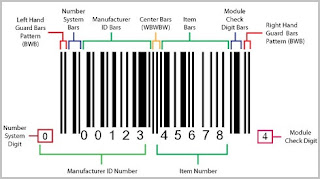
UPC-A is one of the most common retail barcode formats. It is used mainly in North America and contains 12 digits.
The UPC-A number is also known as a GTIN-12. Its structure includes a company prefix, an item reference, and a final check digit.
Illustration of a 12-digit UPC-A number. The final highlighted digit is the check digit.
Company Prefix
A company prefix is allocated through the GS1 identification system. Its length can vary.
Item Reference
The item reference distinguishes a particular product or variation, such as size, color or packaging.
Check Digit
The last digit is calculated mathematically using the preceding digits. It helps identify common entry and scanning errors.
Important clarification: Some older explanations divide UPC-A into a first numbering-system digit, five manufacturer digits, five product digits and one check digit. This is not a universal rule, because GS1 company-prefix lengths vary.
The first digit can be associated with particular UPC numbering ranges. Older retail examples often mention starting digits such as 0, 1, 6, 7 or 8. However, the first digit alone should not be used to identify the manufacturer or verify whether a product is genuine.
What Information Does a Barcode Contain?
Many people assume that a standard retail barcode directly contains product prices, weights, expiry dates, manufacturing dates and manufacturer information.
In most ordinary UPC-A and EAN-13 retail barcodes, the printed number identifies the product. Additional information is normally stored in the retailer's, manufacturer's or ERP database.
| Product Information | How It Is Usually Available |
|---|---|
| Product Identification Number | Encoded in the standard retail barcode. |
| Product Name | Retrieved from a connected product database or ERP system. |
| Price | Usually retrieved from the billing or POS database. |
| Product Weight | Usually stored in the product record or printed separately on the package. Some specialized barcode formats can encode measurement data. |
| Manufacturing Date | Usually printed on the product or stored in batch records. |
| Expiry Date | Usually printed on packaging or stored separately. Certain GS1 barcode formats can encode expiry information. |
| Manufacturer Information | May be associated with the GS1 company prefix or retrieved through an appropriate database. |
Example: When a supermarket scans a product, the POS software can look up its product name, selling price, and inventory details using the barcode number.
How to Read Barcode Information
Follow these simple steps to understand how a barcode is used to retrieve product information.
- Find the Barcode. Locate the barcode and the numbers printed below it on the product packaging.
- Identify the Format. A UPC-A barcode commonly has 12 digits, while an EAN-13 barcode has 13 digits.
- Scan the Barcode. Use a compatible barcode scanner connected to a POS, ERP or inventory application.
- Look Up the Product. The software uses the scanned number to search its product database.
- Review the Information. If the product exists in the database, the system can display its name, price, stock and other saved details.
- Verify Before Using. Confirm that the product details match the actual packaging, especially for inventory and billing operations.
Are Barcode Numbers Unique Worldwide?
The GS1 system is designed to provide globally unique product identification numbers when identifiers are correctly allocated and assigned.
Different trade-item variations may need different GTINs. For example, two clothing items with different sizes may require separate product identification numbers.
However, multiple physical units of the same retail product normally share the same GTIN. A separate serial number may be needed to distinguish individual units.
Barcode identifiers are managed through the GS1 standards system. Businesses requiring officially allocated retail GTINs should obtain them through the appropriate GS1 organization.
Remember: Creating a barcode image is not the same as obtaining an officially assigned GS1 number. A barcode that scans correctly does not automatically prove product registration or authenticity.
Why Are Barcodes Important for Businesses?
Retail Billing
Barcode scanning can help quickly retrieve product information at POS counters.
Inventory Management
Products can be organized and tracked using identifiers linked to inventory records.
Manufacturing
Barcode labels can help identify materials, finished goods, and packaging units.
ERP Integration
A barcode number can connect physical products with their corresponding records in an ERP system.
Product Identification
Standardized codes make product recognition easier across compatible systems.
Reduced Manual Entry
Scanning can reduce the need to type long product numbers manually.
Barcode Number FAQs
Click a question to read a short explanation. Opening another question will close the previous one in supported browsers.
Does a UPC-A barcode always contain 12 digits?
Yes. A standard UPC-A symbol represents a 12-digit GTIN-12, including the final check digit.
Does a barcode contain the product price?
An ordinary retail UPC-A or EAN-13 barcode does not normally encode the current selling price. The price is retrieved from a connected retail or POS database.
Can a barcode show the expiry date?
Standard retail UPC-A and EAN-13 product identifiers do not directly encode expiry dates. Some advanced GS1 barcode formats can carry expiry dates and batch information.
What is the purpose of a check digit?
A check digit is calculated from the other digits using a mathematical formula. It helps detect many common data-entry and scanning errors.
Can the same barcode appear on multiple products?
Multiple units of the same retail product normally share the same GTIN. Different products or variations generally require their own identification numbers under GS1 allocation rules.
Official Barcode Information
For detailed information about UPC, EAN, GTIN and product identification, visit the official GS1 information page.
Free Barcode Label Printing Software
Check Free Barcode Label Printing Software Here. Explore barcode label printing tools for retail shops, garment businesses, manufacturing, inventory management, and other labelling applications.
 Click the original image above
to open the Barcode Label Guru
software page.