
Direct Thermal vs Thermal Transfer Barcode Label Printing
Barcode label printing has many applications, from retail shops to industrial packaging. There are two common thermal printing methods: Direct Thermal and Thermal Transfer. Learn how each method works, when to use it, and which labels to select.
Two Types of Thermal Label Printing
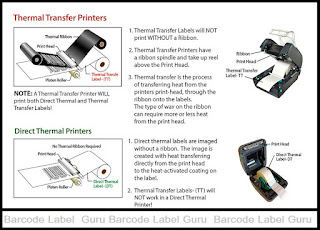
A. Direct Thermal Label Printing: Suitable mainly for temporary labels that do not need to remain readable for a long time.
B. Thermal Transfer Label Printing: Suitable for longer-lasting labels and applications needing better durability.
The best option depends on label lifetime, material, heat exposure, abrasion, moisture and whether you can use a ribbon.
Direct Thermal vs Thermal Transfer: Quick Comparison
| Feature | Direct Thermal (DT) | Thermal Transfer (TT) |
|---|---|---|
| Printing method | Heat darkens special heat-sensitive label material | Heat transfers wax, resin or mixed ribbon coating onto a label |
| Ribbon | No ribbon, ink or toner required | Ribbon required |
| Typical label life | Short-term / temporary use | Longer-term applications, subject to materials and environment |
| Typical uses | Shipping, receipts, visitors, laboratory and delivery labels | Retail products, food packaging, industrial cartons and product labels |
| Limitations | May fade, darken or scratch under heat, sunlight and friction | Ribbon adds consumable cost and requires correct media matching |
Direct Thermal Label Printing
Direct Thermal printing is used when printed labels are needed for a temporary or short-life application.
Common examples
- Delivery and shipping labels
- Laboratory reports and pathology/clinical tags
- Visitor identification labels
- Receipts and temporary package labels
How it works
The printer's heated printhead touches a chemically treated, thermosensitive label. Heat activates its coating (commonly based on leuco-dye chemistry), causing selected areas to darken and produce text, images and barcodes. No ink, toner or ribbon is used.
How long will it last?
The original guide suggests approximately 1–6 months, depending on paper quality and print darkness. This is only an illustrative range, not a guaranteed lifespan: actual durability also depends on heat, sunlight, abrasion, storage conditions and label material.
Printed text may fade, turn brown or darken with age. Friction, scratches and direct or indirect heat can damage the image. Strong heat or sunlight can cause thermosensitive media to darken extensively.
Main advantages: Cost-effective for short-term uses, fewer consumables, simple roll replacement, fast printing and relatively straightforward printer maintenance.

Thermal Transfer Label Printing
Thermal Transfer printing is used when labels need longer-lasting print quality and more resistance to normal handling, abrasion or moisture.
Common examples
- Product labels in retail shops and POS stores
- Packaging boxes for delivery
- Industrial packing boxes and goods identification
- Food packs and other longer-term product labels
How it works
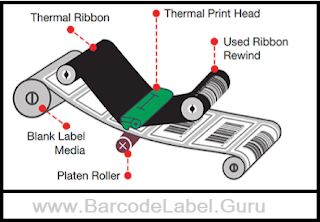
The heated printhead melts the coating on a wax, resin or wax/resin ribbon, transferring it onto a paper or synthetic label. Unlike direct thermal labels, the media itself does not need a heat-reactive coating.
Thermal-transfer media may be made from paper or thermoplastic film. A suitable ribbon and material combination can produce high-quality, durable barcodes with better resistance to moisture, scratching and UV exposure than ordinary direct thermal labels.
Main advantage: More stable, readable print for longer-life labels. Exact durability depends on the ribbon, label material and exposure conditions.
Direct Thermal and Thermal Transfer Video Guide
Watch the original video for a visual explanation of the two barcode-label printing methods.
Why Use Thermal Printing Technology?
Does thermal printing need ink?
Thermal printers do not use traditional liquid ink cartridges or toner. Direct Thermal printing is ribbon-free, while Thermal Transfer printing requires a wax/resin ribbon. Both use heat, but they have different media and operating costs.
Can thermal transfer labels be used in a direct thermal printer?
Ordinary non-heat-sensitive thermal-transfer labels generally cannot be printed by a direct thermal printer. Direct Thermal printing needs a heat-sensitive surface; otherwise, applying heat will not develop an image. Always check your specific printer and media compatibility before purchasing.
Which method should I choose?
Choose Direct Thermal for short-term shipping, visitor, report or receipt labels in controlled conditions. Choose Thermal Transfer where the product barcode needs to remain legible for longer, or when resistance to wear, moisture or storage conditions matters.
Purchase Barcode Labels on Amazon
Original shopping links for the two label-roll types:
Confirm your printer model, label dimensions, core size and ribbon requirements before ordering. These original Amazon links may be affiliate links.
Download Free Barcode Label Printing Software
Click the original download image to open the existing Barcode Label Printing Software page.